Pages

Sila / Please 'LIKE' to support this blog..tq ^^

Jumaat, September 07, 2012

Perspektif IKIM: Inisiatif agama pulihara alam


Lihat di sekeliling kita, satu persatu masalah alam sekitar boleh dikenal pasti. Daripada masalah bersifat tempatan seperti banjir, tanah runtuh serta peningkatan jumlah sampah hinggalah kepada masalah merentasi sempadan seperti jerebu dan hujan asid.

Tidak ketinggalan masalah alam sekitar yang bersifat global seperti masalah penipisan ozon dan pemanasan global. Semua masalah ini pastinya menjanjikan kehidupan tidak enak bagi keseluruhan umat manusia. 
Oleh sebab kehidupan moden manusia dan masalah alam sekitar tidak mungkin dipisahkan, maka jalan penyelesaian kepada masalah ini amat diperlukan. Penyelesaian holistik termasuk aspek sosial, ekonomi, politik, sains dan teknologi adalah gabungan terbaik menyelesaikan masalah persekitaran. 


Adab manusia terhadap alam

Usaha menggabungkan agama dalam pemuliharaan alam sekitar juga wajar diteroka. Harapan kita cuma satu, supaya saluran agama dapat membantu menyentuh hati dan menjadikan manusia beradab terhadap alam ini.

Walaupun ia agak asing di Malaysia, namun usaha ini sudah menjadi kebiasaan pada peringkat antarabangsa. 

Contohnya, usaha Jawatankuasa Bantuan Kebuluran Oxford (Oxfam) bekerjasama dengan pertubuhan bukan kerajaan Muslim Aid yang membantu umat Islam di beberapa negara seperti Bangladesh, Bosnia, Kemboja, Gambia, Indonesia, India, Iraq, Jordan, Kenya, Lebanon, Pakistan, Somalia, Sri Lanka dan Sudan. 
Begitu juga usaha Aga Khan Development Network, kumpulan Muslim yang membantu masyarakat di negara membangun. Persekutuan Hidupan Liar Sedunia (WWF) yang telah sekian lama bekerjasama dengan pelbagai kumpulan agama dalam usaha pemuliharaan alam sekitar. 

Malah, Bank Dunia turut bekerjasama dengan komuniti agama untuk mengurangkan kemiskinan dan mempromosikan pemuliharaan alam sekitar di negara membangun.

Merujuk khusus kepada agama Islam, usaha menggabungkan agama dalam program pemuliharaan alam sekitar wajar dilakukan kerana, agama, komuniti serta negara Islam tidak terkecuali berhadapan pelbagai masalah alam sekitar. 

Sebahagian besar masyarakat Islam kini hidup di negara dikategorikan sebagai negara membangun dan miskin. Bagi negara Islam membangun, tekanan untuk membentuk kekayaan atau menjadi negara maju menyebabkan pembangunan menjadi keutamaan berbanding pemuliharaan alam sekitar. 

Bagi negara miskin pula, kemiskinan dan hutang negara menyebabkan berlakunya penghakisan sumber alam secara intensif demi untuk melunaskan hutang negara mahupun sekadar untuk memastikan kelangsungan hidup rakyatnya. 

Pada masa sama, kehidupan dan keyakinan beragama yang masih menjadi pegangan masyarakat Islam di seluruh dunia, mahupun Malaysia seharusnya menjadi satu motivasi yang kuat untuk menggabungkan agama dalam pemuliharaan alam sekitar.

Ketua agama sertai program kesedaran

Rasa yakin dan hormat kepada ketua agama pula memungkinkan individu ini menjadi ‘watak utama’ dalam usaha pemuliharaan alam sekitar. Di seluruh dunia, usaha membabitkan ketua agama dalam pelbagai program kesedaran bukanlah satu perkara baru. 

Di Pakistan dan beberapa negara Afrika, pembabitan ketua agama dalam program kesedaran HIV/AIDS dan kesihatan reproduktif menunjukkan tahap kejayaan membanggakan. Oleh itu, jika usaha ini boleh dilakukan kenapa tidak ia dilaksanakan dalam program pemuliharaan alam sekitar?

Di Malaysia, sudah ada usaha menggabungkan agama dalam pemuliharaan alam sekitar seperti dapat dilihat daripada usaha WWF Malaysia mengajak imam dalam rancangan pemuliharaan Penyu di Terengganu dan pemuliharaan harimau di Perak. 

Contoh lain, beberapa surau dan masjid di sekitar Selangor terbabit program kitar semula minyak masak untuk biodiesel. Namun usaha ini belum begitu menyeluruh. Oleh itu, perlu ada usaha meningkatkan kerjasama agama, ketua agama dan komuniti agama dalam program pemuliharaan alam sekitar. 

Pertubuhan bukan kerajaan Islam serta program dialog antara agama masa kini terlalu memberikan perhatian terhadap isu mempertahankan kepercayaan dan kedudukan agama. Isu alam sekitar kurang diberikan perhatian. 

Oleh itu, mungkin sudah tiba masanya hal ini diubah dan alam sekitar menjadi satu agenda penting dalam manifesto serta kegiatan pelbagai pertubuhan berasaskan Islam di negara ini. Lagipun, di Malaysia terdapat begitu banyak surau, masjid serta sekolah agama. 

Cuba bayangkan jika setiap satu institusi ini menjalankan aktiviti pemuliharaan alam sekitar, sudah pasti ini akan memberi kesan yang baik terhadap usaha pemuliharaan, pendidikan dan kesedaran alam sekitar.

Selasa, September 04, 2012

7 'Security Tips' untuk Keselamatan Akaun Facebook


Facebook is the number one social network in the world and many of us using it regularly and sharing sour personal info, image with our friends and families. Its the great way to connect with others, But you could also reveal too much about yourself. And you don’t want to share all these information with others.
If you’d like to secure your Facebook account from hackers and spies, you can do this with simple and easy steps. All you have to follow some steps to secure your Facebook Accountfrom hacking or any other threats, So here we will help you to How to secure your Facebook account and guarding your privacy, protecting your personal stuff from hacking.
How to Secure Your Facebook Account – [Facebook Security Tips]
1. Enable HTTPS encryption:-
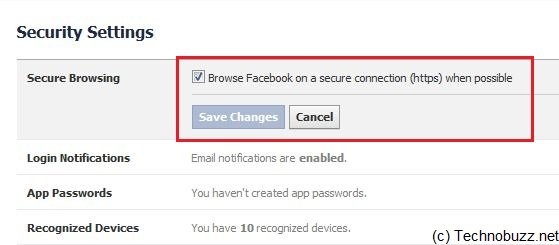
Enable Facebook HTTPS encryption
This feature, which encrypts data transferred during Facebook sessions, is designed to prevent attackers from compromising users’ accounts. To do so, go to your Account Settings > Security and enable Secure Browsing (https).
2. Enable Login Notifications:-
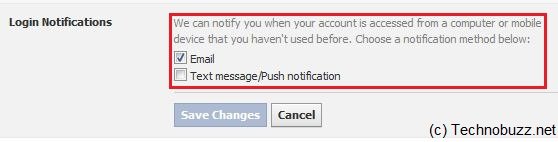
Enable Facebook Login Notifications
To do so, go to your Account Settings > Security and enable the feature which says “Login Notifications”. So when Facebook notify you when your account is accessed from a computer or mobile device that you haven’t used before.
3. Facebook privacy Settings:-
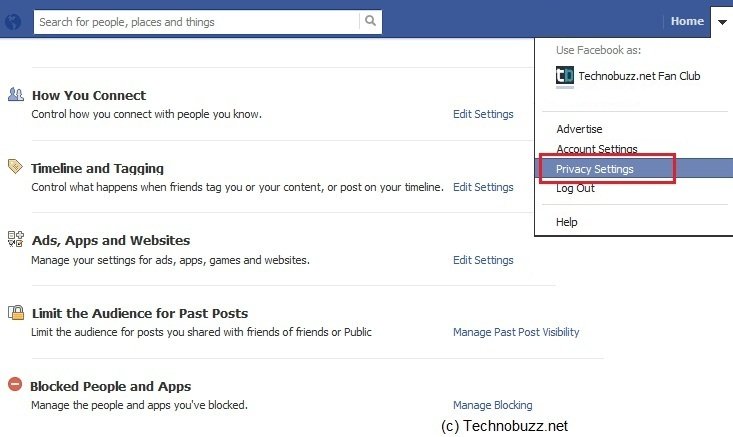
Facebook privacy Settings
This feature will help you to set the privacy of your Facebook Account. If you don,t want to share your personal stuff with others like image or any other data. Than this feature will help you to do this. To do this got yo Click Account > Click Privacy Settings and you will make the changes there like who can see your profile, pics, posts, and all. Here you can manage your privacy setting like who can see your profile, status updates and photos. Also Block people and app from here.
4. Know About Facebook Scam:-
Facebook Scams
Facebook Scams
Facebook Scam is one of the reason which gives hackers to access your Facebook profile and help them to steal your personal data.
5. Pick A Strong Password:-
Pick A Strong Password
Always use a strong password, try to use a combination of at least six numbers, letters, and punctuation marks (like !,@ and &). And never reveal you password with anyone.
6. Add A Security Question To Facebook Account:-
Facebook Security Question
It always help you to verify your account, that you are the owner of your account. In simple words we can say that a useful way to verify you own your account if you ever lose access to it. To add a security question Go to Account Settings >> Security >>Click on the Security Question. If you do not see this option in your account, it is most likely because you have already set your question and its answer.
7. Always check Your Account is hacked or Not:-
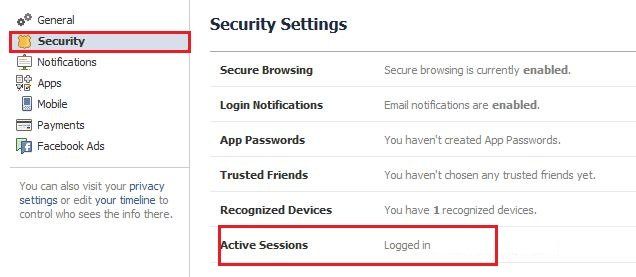
Facebook Active Sessions
Last step to secure your Facebook Account, always check you Facebook account setting that no one using it or hacked by someone. You can do this easily with checking your Active session in your Facebook account.

Hasilkan Facebook Timeline Cover Dengan Instagram Foto


Facebook timeline has a option Facebook Cover, where you can show an image that best represents you as a person. If you are a Instagram user then you can show all your instagram photos on your Facebook cover with he help Insta-Cover web app. The app allows you totransform your Facebook cover photo into a collage of your Instagram photos. You can use all your Instagram personal account images but also other Instagram photos, or a specific category, or any tags of your choice.
The web app is fast and easy. All you need to do is to visit Insta-Cover.com web app and log in using your Facebook account to create awesome Facebook timeline Cover with Instagram photos.
How to Create Facebook Cover with Instagram
1. To get started, go to the Insta-cover home page and click on the button Sign In With Facebook.
Insta Cover
Insta Cover
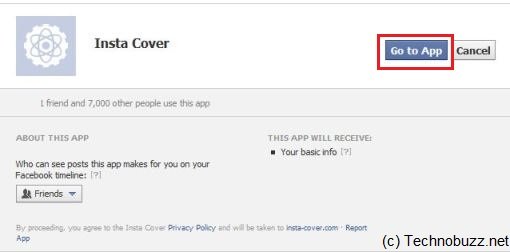
2. Now grant permission to the app. To use the Instacover on your Facebook page. So you can create a Facebook cover with the help of web app.
Instacover Facbeook Access
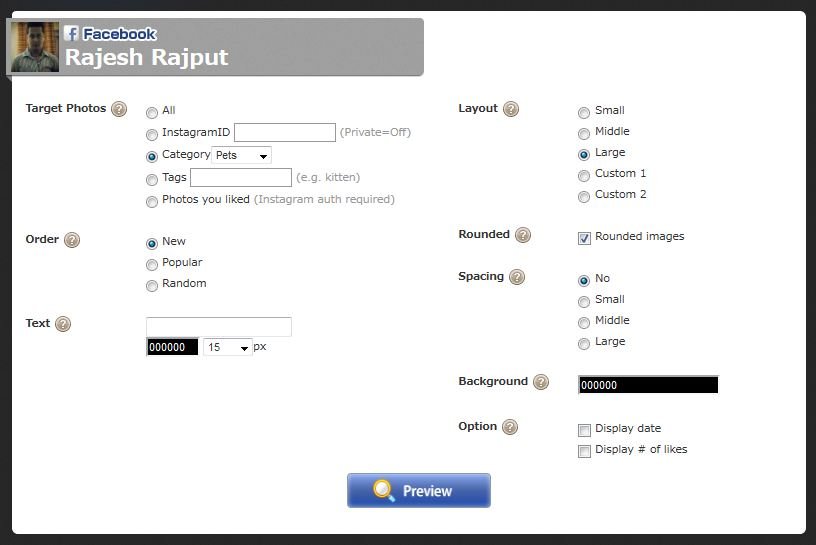
3. Next, you’ll be redirected to InstaCover’s panel for creating a collage, From here you can select the Instgram iD of your or your friends, also give you the option to filter your photos by using the Category or Tags fields. After setting all these, click on Preview.
Instacover Settings
Instacover Settings
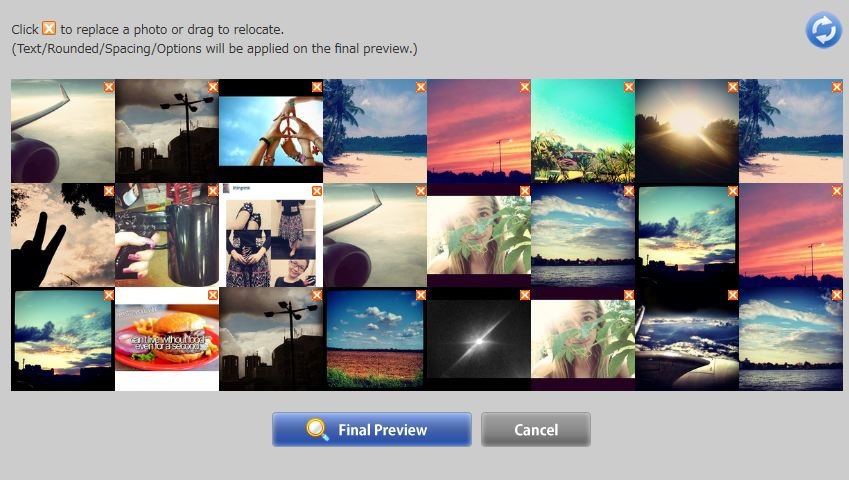
4. Now you can see the preview window, it will also give you the option to delete a photo from that preview, click ion the “X” mark from the image to replace that image with the next image or click on the ‘refresh‘ button at the top right to change all images at once. After doing all changes click theFinal Preview button.
Instacover Preview
Instacover Preview
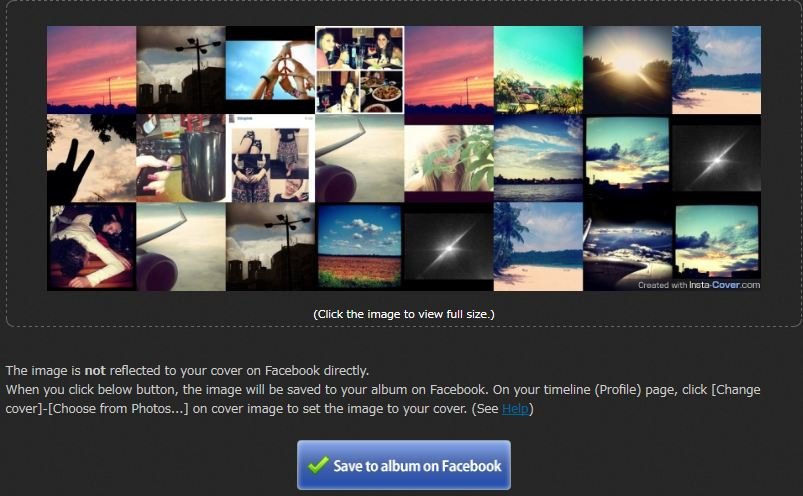
5. Now Final preview create that you can use on your Facebook timeline as a cover. To use the preview as the Facebook cover, click on the “Save to Album on Facebook” button.
Instacover Final Preview
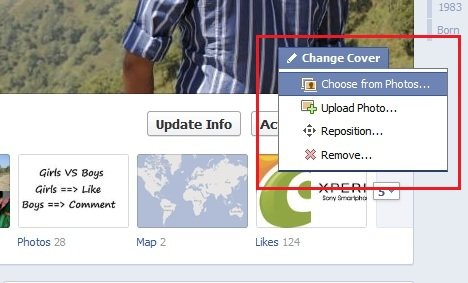
6. Now go to your Facebook account and you Facebook cover is ready to use. To change the Facebook cover click on Change Cover > Choose from Photos.
Change Facebook Cover
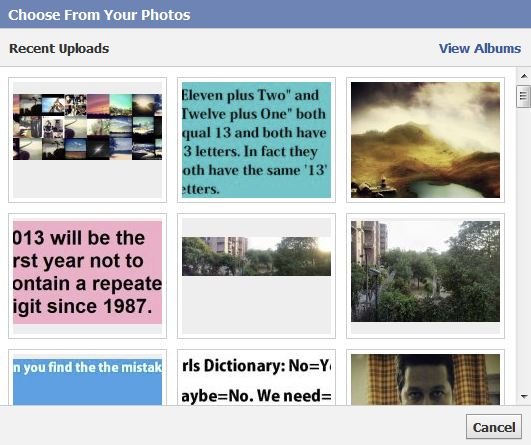
7. Now select the created Instacover from the images to use a Facebook Cover for your timeline.
Instacover Image
Instacover Image
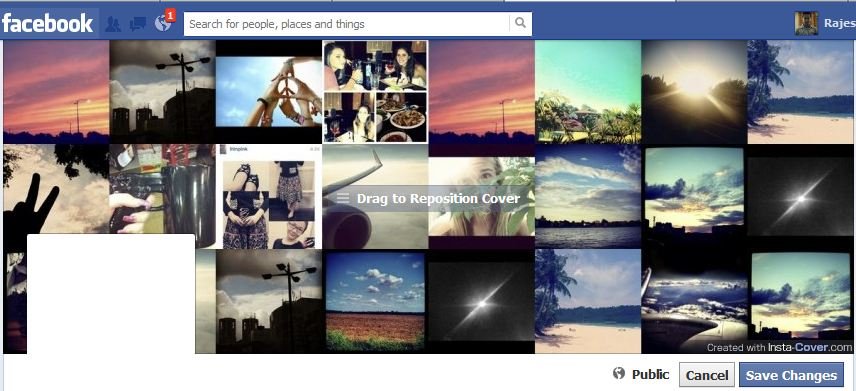
8. Now you can see the Instacover image on your Facebook Cover here you don’t have to adjust the placement, because the image is created following the standard size of 851 x 315 pixels. Click on the Save Changes button to set as Facebook cover for your timeline.
Save Facebook Cover
Save Facebook Cover
Insta-cover is the easiest way to grab all your Instagram Images on your Facebook timeline cover. With this free app you can create stunning cover photos for your Facebook.

Tukar Sebarang 'File' dalam Mana-mana Format Secara Online


Online Converter is free to use Web app, which allows you to Convert media files online from one format into another. All you have to do is select the format in which you want to convert the file. The best part of the app is that you don,t have to install any app on your PC to convert Files. It’s a online converter which helps you to convert any type of file like audio, video, images, docs, pdf and other kinds of files.
Most of the file converters are available on the net, but to sue them you need to install them on your PC or some online converter takes ages to convert the files. Online converter lets you convert media easy and fast from one format to another.
How to Convert File in Any Format with Online Converter
1. Go to the Online Converter Homepage to convert your files or media. Yes, not need to signup the app, it’s totally free.
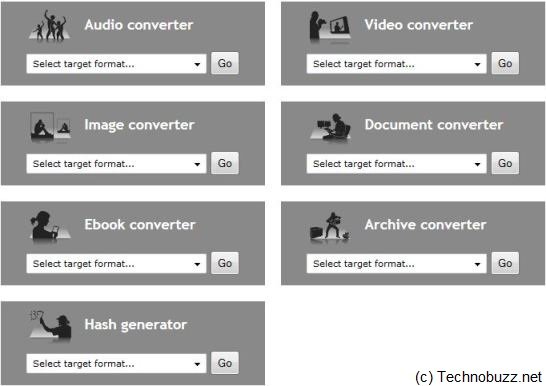
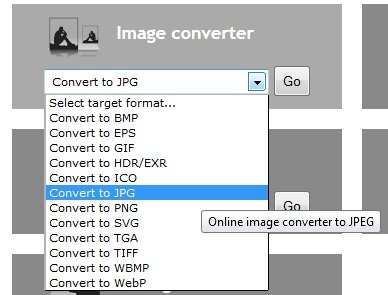
2. At the home page you can see lots of option to convert files like Audio Converter, Video Converter, Image Converter, Document Converter, Ebook Converter, Archive Converter and Hash Converter.
Free Online Converter
3. From here you have to select the option which you want to use to convert files, here we selected the Image Converter to convert PDF file into image.
PDF to Image Converter
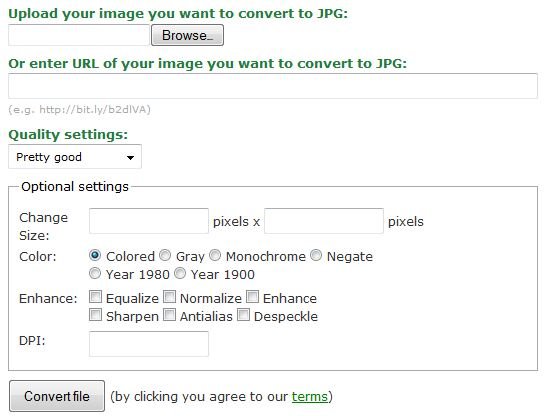
4. Now the new web page will open on your screen and give you the two option to convert files, Choose File to browse your local files, or enter the URL of an online file you want to convert. You can also change thew settings of conversion tool like size, pixels and quality. After doing all these changes hit the convert button from the below to convert your files.
Convert File Settings
Now this will take some time to upload your file and file is converted in the background and then downloaded automatically to your PC. This one is one of the best and easiest way to convert all your files online at one place without installing any app on your Windows PC.